lNTUNE 4.0 is a collection of software tools that are required by control
engineers and process operators alike to start-up, diagnose and maintain
the health of PID loops in a plant. Easy-to-use and designed specifically
for the control systems in your plant operation, INTUNE boasts features
which are unmatched by any other tuning, monitoring or
simulation software.
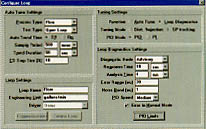
Use INTUNE to automatically generate the optimal PID parameter values
for PID loops. Download tuning constants directly to your control system
and switch to loop diagnostics for monitoring the quality of control.
In the event of detecting any abnormal process response, INTUNE is
equipped with the "intelligent" self tune tool that analyzes the conditions
and self-tunes the loop until it is back to desired operating conditions.
 Log critical process data continuously for
weeks. Use archived data for loop modeling
and simulation to answer all your what-if's?
View important process parameters in one
composite trend and error distribution charts
in another, while you simultaneously self tune
multiple PID loops; the display types and
number of windows you open is limited only
by your imagination!
INTUNE 4.0 software runs on MS Windows 3.1, Windows 95 or Windows NT.
It can connect to your control system using INTUNE direct drivers or by
establishing links to a DDE server in your interface software.
Off-line Tune
The collection of tools in this module allow you to import any ASCII data
file which contains your valuable process information. Typically, INTUNE
expects you to provide a data file with columns of data containing process
variable (temperature, pressure, flow...), setpoint and controller output
data. Process data may be archived by a proprietary control system that
does not offer PC connectivity, by using data logging tools provided
within your system, or external analog signal interface cards.
The off-line data tuning tool uses the imported data to generate process
models and suggest PID tuning parameter values. Using the data-tune loop
configuration and display tools, you may open any number of process
data trends on one or separate windows for subsequent analysis and tuning.
The off-line model tuning tool used exclusively by process engineers,
allows you to enter an estimate of your process model, or even your design
process model, to generate the suggested PID values.
The combination of the above tools allows you to work with any control
system where INTUNE does not provide any connectivity either directly or
through a third party. The off-line data tuning tool uses the imported
data to generate process models and suggest PID tuning parameter values.
Configuration
INTUNE allows you to configure an unlimited number of PID loops and group
them in pre-designed display templates, up to a maximum of 8 PID loops
per display. This enables you to view trends, error distribution charts and
event logs which belong to a process sub-system. A powerful collection
of tools have been designed to navigate INTUNE efficiently and maintain
maximum productivity while on-line.
Loop & Display Configuration
Loops are configured using a fill-in-the blanks form and saved as loop
configuration files. User enters the tuning and diagnostic priorities,
selects trend colors, configures alarm values, etc. In contrast to the
concept of tags per parameter, INTUNE saves all the PID loop configuration
information in a file. Displays consist of an unlimited number of trend,
error distribution, diagnostic and other windows which are configured
using a display configuration tool. Grouping loops functionally (ex. all PID
loops controlling a boiler) in a particular trend configuration, allows
you to analyze a total system as opposed to an individual PID loop.
Tools
INTUNE provides over a dozen unique tools to navigate INTUNE efficiently
when on-line . The status tool provides a summary of the current mode
status of each loop (monitor/diagnostics/tuning test on/time left, etc.).
The "X-Y Co-ordinates" tool displays trend values at cursor locations,
automatically switching to relevant loop parameters when moved from
one trend box to another. The "Change Model" tool allows massaging of
process models generated by INTUNE to better fit the loop dynamics. The
"Compare PID" tool allows overlays of predicted loop responses in
simulation mode to understand the subtle effects of changing inputs.
Numerous functions like tuning start/stop, mode change (auto/manual),
download PID, select loop etc., are all controlled from two unique
toolbars - giving you instant access to the commonly used procedures
within INTUNE.
Multiple Loops
INTUNE allows you to view trends, event logs and error distributions
in groups from two to eight loops at a time. Error distributions give you
the overall view of how the loops have been doing over your time frame
of interest, while event logs are a brief summary of your loop health.
You retain individual control on each loop by selecting the active loop
button from the toolbar. The tools which allow for changing set-point
or modify mode are relevant to the active loop selected at any
point of time.
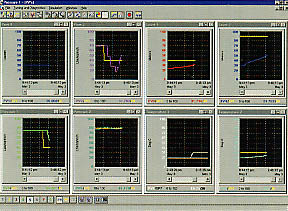
Multiple display windows can be viewed together tiled or cascaded or the
user may scroll through the windows using the scrolling tool. This
feature allows the user to have all the important process information
on a particular system presented in an efficient manner.
Connectivity
INTUNE connects to most process control systems using "INTUNE direct
drivers" or 3rd party DDE drivers. The direct drivers connect either
through serial ports or allow you to connect as a node on a data network.
The DDE driver allows easy access to any control system through DDE
connections with a server. Either way INTUNE maintains real-time
connections with your process PID loops and updates all process
parameters at every sampling interval specified within. A partial list
of vendors whose control systems are supported on INTUNE
are as follows:
...And many more.